
In This Article
Somewhere around the third hour of a video call, your lower back starts sending you a very clear message: this chair is not on your side. That’s usually the moment people start Googling ergonomic chair vs standard office chair, half-hoping the answer is “the cheap one’s fine, don’t worry about it.” It rarely is, but the full picture is more nuanced than “spend more, hurt less.”
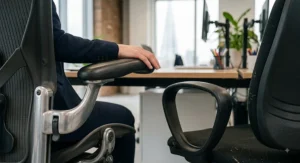
An ergonomic chair vs standard office chair debate really comes down to adjustability and support engineered around how your spine actually moves, versus a fixed, one-size-fits-most seat built primarily for cost and looks. A standard office chair might tilt and swivel, but it usually stops there — no dynamic lumbar tracking, no seat depth adjustment, no real accommodation for different body shapes.
This guide breaks the decision into something you can actually act on: seven real chairs spanning budget to premium, honest analysis of what each one gets right and wrong, and a proper look at whether the ergonomic upgrade earns its keep or just earns your money. We’ll dig into posture correction, spinal alignment, and — because nobody has infinite budget — exactly where the standard office chair vs ergonomic chair cost gap starts to make financial sense. By the end, you’ll know precisely which category (and which chair) suits your back, your budget, and the number of hours you’re actually parked at a desk.
What Is an Ergonomic Chair vs a Standard Office Chair?
An ergonomic chair is a seat engineered around the body’s natural posture, with adjustable lumbar support, seat depth, armrests and recline tension designed to reduce spinal strain during long sitting sessions. A standard office chair offers basic height and tilt adjustment but rarely tailors itself to an individual spine. The gap between the two widens the longer you sit each day.
That distinction matters more than marketing copy suggests. The UK’s own workplace regulations don’t demand fancy branding — the Health and Safety (Display Screen Equipment) Regulations 1992 simply require that a work chair be stable, allow easy freedom of movement, and adjust in seat height plus backrest height and tilt. A lot of standard chairs technically scrape past that legal bar. Whether they scrape past your body’s comfort threshold after eight hours is an entirely different question — and it’s the one this article actually answers.
Quick Comparison Table: Ergonomic Chair vs Standard Office Chair
| Feature | Ergonomic Chair | Standard Office Chair |
|---|---|---|
| Lumbar support | Adjustable, often dynamic | Fixed or minimal |
| Seat depth adjustment | Common on mid-range and up | Rarely available |
| Price range | Around £220 to £1,750+ | Around £70 to £150 |
| Best for | 6+ hours daily desk work | Occasional or light desk use |
| Warranty (typical) | 3–12 years | 1–2 years |
Look at that “best for” row and the decision practically writes itself: it’s not really about which chair is “better” in the abstract, it’s about hours logged. An ergonomic chair pays for its adjustability the moment you’re sitting through back-to-back meetings five days a week, while a standard office chair remains perfectly reasonable for a spare-room desk used twice a week for admin. The price spread is the sobering part — you can spend ten times more on the ergonomic end, so the real skill is matching the spec to your actual sitting hours rather than assuming “expensive equals correct.”
💬 Just one click — help others make better buying decisions too!😊
Top 7 Ergonomic and Office Chairs: Expert Analysis
1. Amazon Basics High-Back Executive Chair — the honest baseline for a standard office chair
The Amazon Basics High-Back Executive Chair is exactly what most people picture when they say “standard office chair” — and that’s precisely why it earns the opening slot here as a benchmark. Height adjusts across roughly 105–114.5cm overall, there’s a tilt-tension knob under the seat, and the bonded leather upholstery gives it a boardroom look for very little outlay. What it doesn’t have is any lumbar adjustment beyond the shape moulded into the foam, and there’s no seat depth or armrest adjustment to speak of.
Based on the spec comparison with the ergonomic chairs further down this list, this is a chair built for cost efficiency and visual polish rather than spinal support — the padding is generous, but generous padding and genuine lumbar support are not the same thing. It suits someone who’s at a desk for two or three hours a day, working from a spare room, or furnishing an office on a tight budget. Reviewers consistently note that the bonded leather looks smart out of the box but can crack or peel with heavy daily use after a year or two, and the weight capacity of 125kg is worth checking against your own needs before buying.
Pros:
- ✅ Genuinely low price point for a full-size chair
- ✅ Smart, boardroom-appropriate bonded leather finish
- ✅ Simple tilt-tension and height adjustment covers basics
Cons:
- ❌ No adjustable lumbar support or seat depth
- ❌ Bonded leather prone to wear within a couple of years
At around £90-£130, the Amazon Basics High-Back Executive Chair is fair value for light, occasional desk use, but it’s not the chair to lean on if you’re sitting through a full working day — which is exactly the gap the rest of this list starts closing.
2. SIHOO M57 — best budget pick with genuine multi-axis adjustment
The SIHOO M57 has become something of a cult favourite among UK home workers, and once you see the spec sheet next to its price tag, it’s easy to understand why. The S-shaped mesh backrest is designed to mirror the spine’s natural curve, and the lumbar support moves both vertically and horizontally rather than sitting fixed in one spot — a feature that’s usually reserved for chairs costing two or three times as much.
What most buyers overlook about the M57 is that its 3D armrests and mechanical headrest let you dial in support across your whole upper body, not just your lower back, which matters enormously if neck and shoulder tension is your problem rather than lumbar pain. The reinforced aluminium base and 330lb (150kg) weight rating also suggest this isn’t a chair that’s cutting corners structurally to hit its price point. Reviewers consistently report that the mesh keeps them notably cooler than foam-padded alternatives during long summer sessions, though some taller users (above roughly 6’2″) find the frame starts to feel a little compact.
Pros:
- ✅ Dual-axis lumbar support rare at this price
- ✅ Breathable full mesh stays cool over long sessions
- ✅ High weight capacity and reinforced aluminium base
Cons:
- ❌ Frame can feel snug for taller users
- ❌ Armrest padding wears faster than the seat mesh
Typically priced in the £220–£310 range, the SIHOO M57 offers arguably the best value-per-adjustment ratio on this entire list — genuinely difficult to beat if your budget caps out around £250.
3. SIHOO Doro C300 — self-adaptive lumbar for changing postures
Where the M57 asks you to manually dial in lumbar position, the SIHOO Doro C300 tries to do some of that thinking for you. Its self-adaptive lumbar support continuously shifts to track your lower back as you move, rather than locking into a single fixed point — useful if you’re someone who slides between upright typing posture and a slouchier “thinking” recline throughout the day. The waterfall-edge mesh seat is designed to reduce pressure behind the knees, and three recline stops (92°, 100° and 112°) give you distinct positions rather than a single stepless tilt.
Here’s what the spec sheet won’t tell you outright: adaptive lumbar systems like this one genuinely shine for people whose posture drifts a lot — fidgety sitters, essentially — but if you sit very still in one position for hours, a simpler fixed-height lumbar pad (like the M57’s) can feel just as supportive for considerably less outlay. Aggregated review sentiment for the Doro line is strongly positive on comfort and build quality, with the main recurring gripe being that the recline mechanism takes a session or two to get used to.
Pros:
- ✅ Lumbar support tracks movement automatically
- ✅ Three distinct, lockable recline angles
- ✅ Waterfall seat edge reduces under-thigh pressure
Cons:
- ❌ Recline mechanism has a learning curve
- ❌ Costs meaningfully more than the M57 for similar core comfort
Expect to pay in the £300–£360 range for the SIHOO Doro C300, positioning it as a sensible step up for anyone who fidgets through the workday and wants the chair to keep pace.
4. FlexiSpot C7 — the adjustability specialist for serious desk workers
The FlexiSpot C7 built its reputation on doing one thing better than almost anyone else at its price: adaptive lumbar support that moves continuously with your body rather than staying fixed. Independent reviewers who tested it across full working days reported no pinch points and no need to keep re-adjusting — which, if you’ve ever spent a day fighting a chair that fights back, is not a small thing. The armrests rotate a full 360 degrees, and the mesh-and-corduroy-style upholstery holds up well to summer heat without feeling clammy.
On paper this means the C7 is aimed squarely at people who’ve already tried a budget ergonomic chair and found it wasn’t quite dialled-in enough — the adjustment range here genuinely rivals chairs at nearly double the price. That said, one reviewer flagged that the adjustment levers aren’t always intuitive to find on first use, and a previous FlexiSpot model developed creaking after months of use, which is worth bearing in mind even though the C7 itself has tested well structurally. A 5-year warranty goes some way to offsetting that concern.
Pros:
- ✅ Self-adaptive lumbar support with proven all-day comfort
- ✅ Fully rotating, highly adjustable armrests
- ✅ Backed by a 5-year manufacturer warranty
Cons:
- ❌ Adjustment controls take time to learn
- ❌ Optional footrest add-on pushes price up further
Priced roughly in the £280–£400 range depending on the footrest option, the FlexiSpot C7 is a strong mid-range pick for anyone treating their chair as infrastructure rather than furniture.
5. Steelcase Series 2 — the engineering-first premium workhorse
Move into genuinely premium territory and the Steelcase Series 2 shows up with a reputation built on decades of ergonomic research rather than viral marketing. Its LiveBack technology flexes the backrest to follow your spine’s movement in real time as you shift position, and the seat uses a naturally flexing frame instead of a foam-and-frame sandwich — a structural approach that’s genuinely different from most of the chairs on this list.
Based on the spec comparison, what you’re paying for here isn’t flashier features so much as engineering consistency: Steelcase’s commercial-grade testing standards mean the mechanisms are built to handle heavy daily use across years, not months, which matters if you’re outfitting a home office you expect to use for the next decade. The trade-off is that the Series 2’s understated design reads as slightly clinical next to more overtly “gaming-chair-adjacent” competitors, and it lacks a headrest unless you pay extra for one.
Pros:
- ✅ Backrest genuinely flexes with spinal movement
- ✅ Commercial-grade build tested for years of heavy use
- ✅ Wide range of size and firmness configurations
Cons:
- ❌ No headrest included as standard
- ❌ Understated looks lack the “premium” visual drama of rivals
Typically sitting around £650–£700, the Steelcase Series 2 is the chair for people who want engineering credibility over showroom flair — a genuinely different philosophy from the flashier premium options further down this list.
6. Herman Miller Sayl — design-led ergonomics without the Aeron price tag
The Herman Miller Sayl was originally conceived as a way to bring Herman Miller’s ergonomic pedigree to a wider audience, and it largely succeeds — its distinctive suspension backrest (inspired by the shape of the Golden Gate Bridge, genuinely) flexes to support a wide range of body types without a separate lumbar adjustment dial. The frame uses a tension-based mesh rather than traditional foam padding, which keeps the whole chair notably lighter than most premium rivals.
What most buyers overlook about the Sayl is that its lack of a manual lumbar knob isn’t a missing feature so much as a design choice — the backrest is engineered to flex and support without one, which works beautifully for some spines and feels slightly under-supportive for others, particularly people with pronounced lower-back curvature. It’s a chair that rewards trying before committing to size, which is worth factoring in if you’re buying without the option to sit in one first.
Pros:
- ✅ Iconic, design-award-winning aesthetic
- ✅ Lightweight suspension backrest flexes to the spine
- ✅ Lower cost of entry into the Herman Miller ecosystem
Cons:
- ❌ No manual lumbar adjustment dial
- ❌ Less lower-back support for pronounced spinal curves
Generally priced in the £700–£950 range, the Herman Miller Sayl suits buyers who want genuine design-house ergonomics and don’t mind a slightly firmer, less adjustable lumbar experience in exchange for that unmistakable silhouette.
7. Herman Miller Aeron — the icon, remastered for modern spines
No ergonomic chair conversation gets far without the Herman Miller Aeron coming up, and there’s a reason it sits permanently in the Museum of Modern Art’s design collection. Originally designed by Bill Stumpf and Don Chadwick in 1994, the Aeron underwent a full ergonomic redesign in 2016 that updated its PostureFit SL lumbar system, refined its 8Z Pellicle mesh, and introduced adjustable arm and tilt mechanics that respond to your actual weight distribution rather than a single preset tension.
Here’s what the spec sheet won’t tell you, but three decades of workplace adoption does: the Aeron’s reputation isn’t hype — it’s genuinely one of the most extensively studied ergonomic chairs on the market, and it comes in three distinct frame sizes (A, B, C) rather than a one-size-fits-all shell, which is unusual even among premium competitors. The question isn’t really whether it’s good — it demonstrably is — it’s whether the price gap over the Steelcase or FlexiSpot options above buys you a proportionate improvement, and for most home workers, it doesn’t quite. For people sitting 8+ hours daily in a demanding professional environment, though, that calculation shifts.
Pros:
- ✅ Three frame sizes for genuinely tailored fit
- ✅ PostureFit SL lumbar system backed by decades of use
- ✅ Exceptional resale value and long-term durability
Cons:
- ❌ Premium price puts it out of reach for many buyers
- ❌ Overkill for light or occasional desk use
Priced from roughly £1,250 up to £1,750 depending on frame size and configuration, the Herman Miller Aeron remains the benchmark against which every other “premium” chair on this list is quietly measured.
Ergonomic Chair vs Standard Office Chair: The Real Differences
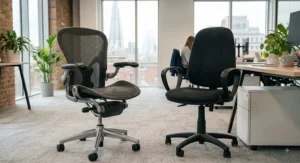
Strip away the marketing language and the ergonomic chair vs standard office chair divide comes down to three engineering decisions: adjustability, materials, and how the backrest actually behaves under load. A standard chair like the Amazon Basics High-Back Executive Chair uses fixed-shape foam moulded into a generically supportive curve — it works reasonably well for an average build and falls short fast for anyone outside that average. An ergonomic chair, whether that’s the SIHOO M57 or the Herman Miller Aeron, treats the backrest as a dynamic system that responds to your specific spine.
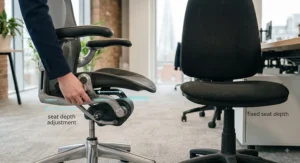
The second difference is seat depth. Almost none of the standard chairs on the market let you adjust how far the seat pan extends beneath your thighs, which means shorter users end up with pressure behind the knees while taller users lose lower-back contact entirely. Nearly every ergonomic option from the SIHOO Doro C300 upward addresses this directly. Third, and often underrated: materials fatigue differently. Standard bonded-leather chairs tend to degrade cosmetically first (cracking, peeling) while ergonomic mesh chairs tend to lose tension gradually over years rather than failing suddenly — a genuinely different ownership experience even before you factor in comfort.
How to Choose Between an Ergonomic Chair and a Standard Office Chair
- Count your actual daily sitting hours. Under three hours a day, a standard chair like the Amazon Basics High-Back Executive Chair is defensible; beyond five or six, the maths tips firmly toward ergonomic.
- Check for existing back or neck discomfort. If you’re already managing pain, prioritise adjustable lumbar and seat depth over price — the SIHOO M57 covers both affordably.
- Measure your height against seat depth ranges. Taller and shorter users both benefit disproportionately from adjustable depth, which rules out most standard chairs.
- Decide how much fidgeting you do. Frequent posture-shifters do well with adaptive lumbar systems like the SIHOO Doro C300 or FlexiSpot C7; still sitters can often get away with simpler fixed support.
- Set a realistic budget band, not a single number. Think in terms of the price ranges above rather than chasing the exact cheapest listing — chair pricing shifts constantly around sales events.
- Factor in your desk’s lifespan expectations. A chair bought for a 2-year home setup has different priorities to one meant to last a decade, which is where the Steelcase Series 2 or Herman Miller Aeron start to justify themselves.
- Try before you buy where possible. Showroom or returns-window testing matters most for chairs like the Herman Miller Sayl, where fit varies noticeably between body types.
Is an Ergonomic Chair Worth It?
The honest answer is: it depends entirely on your sitting hours, not on some universal verdict about ergonomic chairs being “better.” For someone working a genuine full-time desk job — five days a week, six-plus hours a day — the evidence leans strongly toward yes. Reviewers and workplace ergonomics research consistently link poor seated support to musculoskeletal strain over time, and the Health and Safety (Display Screen Equipment) Regulations 1992 exist precisely because this isn’t a fringe concern — it’s a recognised occupational health issue.
Where the “worth it” calculation gets murkier is at the margins: someone using a desk twice a week, or a student with a laptop on the kitchen table most days, is unlikely to see proportional benefit from a £1,500 Aeron over a well-chosen £250 SIHOO. Is an ergonomic chair worth it largely comes down to a simple ratio — hours sat per week divided into the price difference. Do that maths honestly before you buy, rather than assuming premium automatically means correct for your situation.
✨ Ready to stop negotiating with your lower back every afternoon? Compare current prices on today’s picks before they change.
Ergonomic Chair Benefits You’ll Actually Feel
Marketing copy loves to promise “all-day comfort,” but the genuine, measurable ergonomic chair benefits tend to be more specific than that. Adjustable lumbar support reduces the tendency to slump forward as fatigue sets in — which matters because slumping flattens the spine’s natural lordotic curve and puts additional strain on the lower back’s structures. Seat depth adjustment improves circulation behind the knees, something almost entirely absent from standard chairs. Breathable mesh backs, found on most of the chairs from the SIHOO M57 upward, reduce the heat build-up that makes people shift restlessly (and uncomfortably) through long afternoons.
There’s also a less obvious benefit: adjustable armrests reduce shoulder and neck tension by letting your arms rest at a natural angle rather than reaching up or down to the keyboard — something the FlexiSpot C7‘s fully rotating arms do particularly well. None of this means an ergonomic chair fixes bad posture on its own; it removes some of the physical obstacles that make good posture harder to maintain over an eight-hour stretch.
Standard Office Chair vs Ergonomic Chair Cost: Long-Term Value
Sticker price tells only half the story in the standard office chair vs ergonomic chair cost comparison. A £100 standard chair that needs replacing every two years because the foam has flattened and the leather has cracked actually costs you more across a decade than a £300 ergonomic chair with a genuine five-year warranty, once you do the arithmetic properly.
| Chair | Typical Price Range | Typical Warranty | Best For |
|---|---|---|---|
| Amazon Basics High-Back Executive Chair | £90–£130 | 1 year | Light, occasional use |
| SIHOO M57 | £220–£310 | 3 years | Budget-conscious daily users |
| FlexiSpot C7 | £280–£400 | 5 years | Serious full-time desk work |
| Herman Miller Aeron | £1,250–£1,750 | 12 years | Long-term, heavy daily use |
That warranty column does a lot of quiet work in this table. A 12-year warranty on the Herman Miller Aeron effectively spreads its cost to roughly £100–£145 per year of ownership, which is genuinely comparable to replacing a cheap standard chair every couple of years — except you’re not sitting on a degrading chair for the final year of each cycle. The FlexiSpot C7‘s 5-year cover puts it at a similarly favourable annualised cost, which is arguably the strongest value case on this entire list for someone at a desk full-time.
Posture Correction: What an Ergonomic Chair Can and Can’t Fix
It’s worth being blunt here: no chair, however well engineered, actively corrects posture on its own. What a properly adjusted ergonomic chair does is remove some of the physical incentives to slouch — supporting the lumbar curve so you don’t have to fight gravity to maintain it, and offering armrests positioned so your shoulders aren’t creeping up toward your ears by mid-morning. Posture correction is ultimately something you do, with the chair as a supporting tool rather than a substitute.
NHS guidance on seating and ergonomics for back pain reinforces this: proper posture setup involves lengthening the spine to its natural balanced position and keeping the head and shoulders in line with the buttocks, which requires active adjustment of the chair to your body rather than the chair doing the work unassisted. A standard chair without lumbar adjustment makes this active correction considerably harder, since there’s nothing to fine-tune — you’re simply working with whatever curve the foam happened to be moulded into.
Spinal Alignment and Sitting: The Science Bit
Your spine holds a natural S-shape when viewed from the side, and the lower section — the lumbar spine — curves gently inward. Sitting for long periods without support for that curve tends to flatten it, which shifts pressure onto the spinal discs rather than distributing it evenly across the muscles and joints designed to bear it. This is the mechanical reason spinal alignment keeps coming up in ergonomic chair marketing, and it’s not just a buzzword — it’s a genuine, well-documented biomechanical concern for people who sit for the majority of their working day.
Chairs with dynamic lumbar tracking, like the SIHOO Doro C300 and FlexiSpot C7, are specifically engineered to maintain contact with that curve even as you shift position, rather than only supporting it in one fixed posture. Static, fixed-lumbar chairs — including most standard office chairs — only maintain that alignment in the exact position they were designed for, which is one reason people slump more in cheaper chairs as the day wears on: the support simply isn’t following them anymore.
Practical Usage Guide: Setting Up Your New Chair in the First 30 Days
Buying the right chair only solves half the problem — the other half is set-up, and this is where most people quietly undo their own investment. Start with seat height: your feet should sit flat on the floor (or a footrest) with your knees roughly level with your hips. Next, adjust lumbar depth and height until the support sits in the small of your back, not below it — a surprisingly common mistake that leaves the lumbar pad essentially decorative. Set armrests so your elbows rest near a 90-degree angle without your shoulders lifting to reach them.
In the first month, expect to make small adjustments every few days as your body settles into the new support — this is normal and doesn’t mean the chair is wrong for you. A common early mistake is locking the recline tension too tight in an attempt to feel “supported,” which actually restricts the natural micro-movements that keep circulation flowing. Loosen it slightly and let the chair do some of the work. Finally, build in movement: even the best ergonomic chair benefits from you standing, stretching or walking for a minute or two every 30 minutes, since no seated posture — however well supported — is ideal held statically for hours on end.
Real-World Scenarios: Who Actually Needs to Upgrade?
The hybrid worker, three days in the office, two at home. With a decent chair already provided at the office, the home setup is the weak link. Someone in this position is usually well served by a mid-range pick like the SIHOO M57 — enough adjustability to matter, without paying premium prices for a chair used part-time.
The full-time remote employee with existing lower-back discomfort. This is the scenario where spending more clearly pays off. Six-plus hours daily, five days a week, with an existing pain point to manage points toward the FlexiSpot C7 or, budget allowing, the Herman Miller Aeron — the adaptive lumbar tracking in both directly addresses the “supports you as you shift” problem that static chairs can’t solve.
The student or occasional freelancer working from a shared kitchen table. Low daily hours, tight budget, and a chair that needs to be reasonably portable or unobtrusive. The Amazon Basics High-Back Executive Chair is a perfectly sensible choice here — spending £1,000+ on ergonomics for two hours of sitting a day simply doesn’t return proportional value.
The Chair Upgrade Decision: A Simple Framework
If you’re still on the fence, run this quick priority checklist before spending anything:
- If you sit under 3 hours a day → a standard chair is genuinely fine; don’t overspend.
- If you sit 3–6 hours a day with no existing discomfort → a budget ergonomic chair like the SIHOO M57 covers the gap.
- If you sit 6+ hours daily or already have back/neck pain → prioritise adaptive lumbar support, such as the FlexiSpot C7 or SIHOO Doro C300.
- If you’re outfitting a chair for a decade of heavy professional use → the annualised cost of the Steelcase Series 2 or Herman Miller Aeron starts to make sense.
- If fit and sizing matter more than price → try the Herman Miller Sayl or Aeron in person where possible; body shape affects these chairs more than most.
The chair upgrade decision isn’t really about finding “the best chair” in isolation — it’s about matching adjustability to your actual sitting pattern, which is a much narrower and more answerable question.
Common Mistakes When Buying an Office Chair
The single biggest mistake is buying on looks rather than adjustability — a chair can look expensively minimalist and still lack the lumbar or seat-depth adjustment that actually matters. A close second is ignoring weight and height ranges; most spec sheets list a maximum weight capacity and a recommended height range, and skipping that check is how people end up with a chair that’s technically “ergonomic” but poorly matched to their body.
A third common error is assuming assembly quality equals long-term durability — flat-pack ergonomic chairs can be excellent, but reviewers consistently flag creaking or loosening mechanisms after months of heavy use on certain models, which is why warranty length is worth weighing as heavily as the initial spec sheet. Finally, people frequently buy for the desk they have today rather than the sitting pattern they expect over the next few years — worth considering if a promotion, a new hybrid policy, or a health condition might change your daily hours.
Safety, Regulations and Workplace Compliance in the UK
If you’re setting up a home office as part of an employment arrangement, UK workplace law isn’t just a nice-to-have consideration — it’s a legal one for employers. The Health and Safety Executive’s guidance on working with display screen equipment sets out the main risks of prolonged desk-based work, including musculoskeletal disorders such as back pain, and requires that any work chair provided be stable, height-adjustable, and adjustable in backrest tilt.
For self-employed and freelance workers, these regulations technically don’t apply directly, but the underlying health rationale absolutely does — the biomechanical strain on your spine doesn’t check your employment status before causing discomfort. Employers running formal DSE assessments will typically check for exactly the features covered throughout this guide: adjustable lumbar support, height-adjustable seating, and available footrests, which is a useful informal checklist even if nobody’s formally assessing your home desk.
FAQ
❓ Is an ergonomic chair really worth the extra money over a standard office chair?
❓ What's the actual cost difference between an ergonomic chair and a standard office chair?
❓ Can an ergonomic chair fix bad posture on its own?
❓ How do I know if my current chair is causing my back pain?
❓ How often should ergonomic chairs be replaced?
Conclusion
The ergonomic chair vs standard office chair decision isn’t really a battle between good and bad furniture — it’s a question of matching support to hours sat. For light, occasional desk use, a chair like the Amazon Basics High-Back Executive Chair does its job without overspending. For anyone logging serious daily hours, though, the adjustable lumbar, seat depth and materials engineering in chairs like the SIHOO M57, FlexiSpot C7, or — for those with budget to match ambition — the Herman Miller Aeron, genuinely earn their higher price tags through years of reduced strain rather than years of replacement.
If there’s one habit worth taking from NHS back-care guidance into your own home office, it’s this: choosing the right chair is only one part of protecting your back — posture, movement and workstation set-up all play their part too. Pick the chair that matches your actual sitting pattern, set it up properly using the guide above, and let it do the job it was engineered for.
Recommended for You
- 7 Best Ergonomic Office Chairs for Home Office in 2026
- Best Ergonomic Office Chair 2026: 7 Top UK Picks From £130
Disclaimer: This article contains affiliate links. As an Amazon Associate, I earn from qualifying purchases. If you purchase products through these links, we may earn a small commission at no additional cost to you.
✨ Found this helpful? Share it with your friends! 💬🤗
