In This Article
An ergonomic office chair for home office use is a seat engineered with adjustable lumbar support, seat depth, armrests and tilt tension so it moulds to your body rather than forcing your spine into someone else’s idea of “normal.” That’s the textbook definition. What it actually means, in practice, is the difference between finishing a workday feeling like yourself and finishing it feeling like you’ve been folded into a filing cabinet for nine hours.
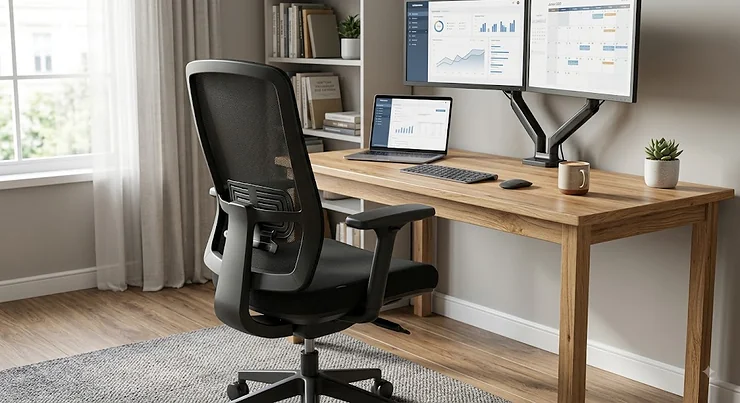
If you’ve spent any time researching this topic, you’ll know the market is a swamp of superlatives. Every chair on Amazon claims to be “ergonomic,” most product photos show someone leaning back with a serene, pain-free smile, and almost none of the listings tell you what actually matters: whether the lumbar support sits where your lower back sits, whether the chair fits under a desk that’s jammed into the corner of a spare bedroom, or whether it’ll still feel supportive after eighteen months rather than eighteen days. The Health and Safety Executive’s display screen equipment guidance exists precisely because bad seating at a desk is one of the most common, most preventable causes of musculoskeletal strain in UK workplaces — and that applies just as much to a kitchen table set-up as it does to a corporate office floor.
This guide cuts through the noise with seven real, currently available chairs spanning budget, mid-range and premium price points, all assessed against genuine specifications and aggregated customer-review sentiment rather than marketing copy. We’ve paid particular attention to space-conscious picks, because “I’d love a proper ergonomic chair, but my home office is basically a converted cupboard” is one of the most common frustrations we hear. Whether you’re kitting out a spare room, squeezing a desk into a box bedroom, or just tired of your lower back staging a protest by 3pm, there’s a genuinely sensible option ahead — not a sales pitch dressed up as one.
Quick Comparison Table
If you’re short on time, here’s the shape of the market at a glance. Full breakdowns, pros, cons and honest verdicts follow below.
| Chair | Best For | Price Range | Key Strength |
|---|---|---|---|
| SIHOO M102C | Small home offices on a budget | £130–£160 | Flip-up arms, slides under low desks |
| FlexiSpot Foldex | Studio flats & shared spaces | £150–£220 | Folds flat in seconds |
| SIHOO M18 | All-round value | £150–£170 | Five-point adjustability |
| SIHOO Doro C300 | Full-time WFH professionals | £260–£340 | Adaptive lumbar that moves with you |
| FlexiSpot C7 | Taller or larger-framed users | £250–£320 | Wide seat-depth and height range |
| Steelcase Series 1 | Long-term investment, compact frame | £350–£450 | Lighter, smaller Steelcase build |
| Herman Miller Sayl | Design-conscious small rooms | £650–£850 | Smallest footprint of any premium chair |
Looking at this spread, the pattern that jumps out is that price doesn’t track neatly with “how small will this feel in my room” — the Herman Miller Sayl is the most expensive chair here and also the most space-efficient in silhouette, while the FlexiSpot Foldex proves you can get genuine folding practicality without spending premium money. If your budget caps out under £200, the SIHOO M102C and SIHOO M18 cover that bracket well; above £250, the differentiator becomes adjustability depth and build longevity rather than basic comfort, which the sections below unpack properly.
💬 Found a chair that looks right for your space? Bookmark this page and compare it against the full breakdown below before you buy.🤗
Top 7 Ergonomic Office Chairs for Home Office: Expert Analysis
We shortlisted these seven after cross-referencing spec sheets, manufacturer certifications (BIFMA, TÜV, SGS where applicable) and aggregated review sentiment from UK and international retail listings. Every chair here is a real, current product — no invented models, no fictional “editor’s choice” filler.
1. SIHOO M102C — best space-saving pick under £160
The standout feature here is the flip-up armrest design, which lets the whole chair slide flush under a low desk when you’re not using it — a genuine problem-solver if your “office” doubles as a dining nook. Specs-wise, the SIHOO M102C offers a 6cm vertical lumbar adjustment range, a high-back mesh design, and a weight capacity of 136kg, with TÜV certification and compliance with US SGS BIFMA endurance benchmarks. On paper, that combination of separately adjustable lumbar support and a wide, deepened seat pan matters more than it sounds: most sub-£150 chairs bolt a fixed lumbar bump onto the backrest and hope it lines up with your spine, whereas this one lets you move the support point to where your actual curve sits.
Based on the spec comparison with other budget mesh chairs, the M102C earns its “ergonomic” label rather than just wearing it as a marketing term — the separated lumbar mechanism alone puts it a tier above chairs at a similar price that only offer backrest recline. It’s best suited to buyers furnishing a first home office on a tight budget, students, or anyone who needs a chair that physically disappears under the desk between sessions. Reviewers consistently report that the chair is comfortable for full working days and note the lumbar support as a highlight, with several long-term users specifically praising how it holds up daily use over months rather than weeks; a smaller number mention the armrest padding as on the firmer side.
Pros:
- ✅ Flip-up arms let it tuck fully under low desks
- ✅ Separately adjustable 6cm lumbar range, not just recline
- ✅ TÜV and BIFMA-tested for 136kg capacity
Cons:
- ❌ Armrest padding feels firm to some users
- ❌ Headrest is fixed height on the base model
Price sits around £130-£160, and at that range, the value case is straightforward: check current price, but this is one of the few genuinely space-conscious ergonomic chairs that doesn’t feel like a compromise.
2. FlexiSpot Foldex — best for the tiniest home offices
The FlexiSpot Foldex does something almost no other chair on this list does: it folds. The backrest tilts down and the whole unit collapses flat in a couple of seconds, which is a genuinely different proposition to “compact” chairs that are merely smaller — this one can be stood in a cupboard or slid behind a sofa when the working day ends. Underneath the party trick, it’s still a proper ergonomic chair: adjustable 3D headrest, height-adjustable lumbar support, flip-up armrests, an integrated footrest, and a backrest that tilts between 105° and 135°, all rated to a 136kg (300lb) weight capacity.
What most buyers overlook about folding furniture in general is that it usually means a compromise on stability — folding desks wobble, folding beds creak. Here’s what to weigh: the Foldex’s frame uses a heavy-duty base with the folding mechanism isolated to the backrest hinge, so the seat itself doesn’t inherit the flex you’d expect from a fully collapsible design. That’s a meaningfully different engineering choice to a flimsy folding chair, and it’s why this earns a spot over cheaper folding alternatives that skip the ergonomic adjustments entirely. It’s the obvious pick for anyone in a studio flat, a shared spare room, or a workspace that needs to revert to “not an office” outside of working hours. Aggregated review sentiment on the folding mechanism specifically is positive, with users highlighting how quickly it stows away; a recurring complaint concerns assembly instructions being less than intuitive on first setup.
Pros:
- ✅ Folds flat in seconds for genuinely tight spaces
- ✅ Built-in footrest and 3D headrest included
- ✅ 105°–135° backrest tilt range
Cons:
- ❌ Assembly instructions are frequently criticised
- ❌ Folding hinge needs occasional tightening over time
Prices have ranged roughly £150-£220 depending on retailer promotions at the time of research, so check current price before buying — this category moves around more than most.
3. SIHOO M18 — best all-round value pick
The standout here is five distinct ergonomic adjustment points on a chair that regularly sits under £170, which is an unusually generous spec sheet for the price bracket. The SIHOO M18 covers headrest height, backrest recline, lumbar position, seat height and armrest position, and its design has reportedly been informed by digital human modelling to encourage a supportive default posture. It also carries both BIFMA and SGS certification and has passed a static pressure test rated to 1136kg, with an overall user weight capacity of up to 150kg — genuinely reassuring numbers for a chair at this price point, and higher than several of its direct rivals.
What the spec sheet won’t tell you, but reviewers note, is how the W-shaped, waterfall-edge seat pan actually behaves during a long sitting session: the front edge is contoured to reduce pressure behind the knees, which matters more the longer your working day runs. On paper this means fewer pins-and-needles moments during video calls that overrun. This is the pick for buyers who want the broadest adjustability without stepping into mid-range pricing — freelancers, remote employees whose employer isn’t funding the setup, or a second chair for a household with two home workers. Reviewers consistently highlight the rollerblade-style casters as smoother and quieter on hard flooring than the standard casters found on cheaper alternatives, though a handful note the mesh can feel less plush than foam-cushioned rivals during the first few sittings.
Pros:
- ✅ Five independent adjustment points at a budget price
- ✅ Passed 1136kg static pressure and BIFMA/SGS testing
- ✅ Smooth rollerblade-style casters on hard floors
Cons:
- ❌ Mesh seat feels firmer than foam alternatives at first
- ❌ Fewer colour options than premium competitors
Expect a price in the £150-£170 range, making this one of the strongest pound-for-pound picks on this list.
4. SIHOO Doro C300 — best mid-range upgrade
The SIHOO Doro C300 is SIHOO’s flagship model, and the standout feature is its adaptive lumbar support, which is designed to track your movement rather than sitting in a single fixed position. Where the M18 and M102C offer manual lumbar adjustment, the Doro C300 uses a mechanism that continues supporting your lower back as you shift, lean or reach — a meaningfully different experience across a full working day rather than a single static “correct” posture.
Based on the spec comparison against the rest of this list, the jump in price from the M18 to the Doro C300 buys you three concrete things: a self-adjusting lumbar system, noticeably more premium 3D armrests, and a sturdier overall build feel that reviewers frequently describe as closing the gap toward far pricier office-brand chairs. Here’s what to weigh: if your working days are genuinely long (eight-plus hours, most weekdays), the adaptive lumbar mechanism earns its price premium quickly, because static lumbar bumps tend to become less effective the more you move around during the day — and remote workers move more than the stock product photos suggest, reaching for coffee, twisting to a second monitor, leaning into calls. This is best suited to full-time home workers who’ve outgrown a starter chair and want a noticeable step up without spending premium-brand money. Aggregated reviewer sentiment consistently praises the lumbar support and overall build solidity; a recurring, more minor complaint concerns the recline mechanism feeling slightly stiff until it’s been used for a few weeks.
Pros:
- ✅ Adaptive lumbar support moves with your posture
- ✅ Noticeably more premium 3D armrests than entry SIHOO models
- ✅ Build quality reviewers compare favourably to pricier brands
Cons:
- ❌ Recline mechanism can feel stiff when new
- ❌ Priced above most budget-tier competitors
Price ranges around £260-£340 depending on colourway and current promotions — check current price, as SIHOO runs frequent discount periods.
5. FlexiSpot C7 — best for taller or larger-framed users
The FlexiSpot C7 stands out for its unusually wide adjustment range: seat depth adjusts between 17 and 20 inches and seat height between 19.3 and 22.6 inches, with FlexiSpot stating the chair suits users roughly between 5’4″ and 6’5″. That’s a considerably broader fit window than most of this list, which matters enormously in a home office context where the chair often has to work for more than one household member.
Key specs with real-world meaning: the dynamic lumbar support and height/tilt-adjustable headrest combine with fully adjustable 3D armrests (height, forward/back and swivel) to give genuinely fine-grained positioning, and the included footrest is a small but useful touch for anyone whose desk and chair heights don’t perfectly match their leg length — a surprisingly common issue in home offices built around desks that were never designed with a specific person in mind. What most buyers overlook about seat depth specifically is that it’s the adjustment most likely to cause knee or hip discomfort if ignored, because a seat pan that’s too long behind the knee cuts off circulation over a long sitting session, and too short leaves the thighs unsupported. Reviewers consistently note the C7 as accommodating larger frames comfortably where cheaper mesh chairs feel restrictive, and it’s rated by independent testers as a strong “value ergonomics” pick; a smaller number of reviews mention the recline lockout positions as less granular than premium alternatives.
Pros:
- ✅ Exceptionally wide seat depth and height adjustment
- ✅ Fully adjustable 3D armrests plus included footrest
- ✅ Comfortably fits larger and taller frames
Cons:
- ❌ Recline lockout has fewer fixed positions than premium rivals
- ❌ Bulkier footprint than the SIHOO options on this list
Prices generally fall in the £250-£320 range — always check current price, as FlexiSpot regularly runs seasonal promotions on the C7 range.
6. Steelcase Series 1 — best lightweight premium pick
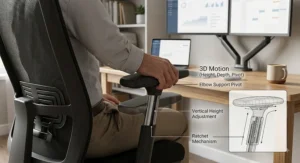
The Steelcase Series 1 sits just below Steelcase’s flagship Series 2 in the brand’s lineup, and the standout feature is that it’s noticeably lighter and more compact than its bigger sibling while retaining genuine Steelcase engineering — a smart middle ground for a smaller home office where a bulky executive chair simply won’t fit the room. It comes with 4D adjustable armrests (up/down, forward/back, side-to-side and pivot), adjustable lumbar support and a smooth, controllable recline mechanism.
Based on the spec comparison, the case for the Series 1 over cheaper alternatives is less about any single headline feature and more about mechanical longevity — Steelcase builds its chairs to be serviced and to last well over a decade, which changes the cost-per-year maths considerably even against a chair with a higher sticker price (more on that in the long-term cost section below). What the spec sheet won’t tell you, but independent reviewers note, is that the smaller frame genuinely changes how the chair feels in a tight room: it doesn’t dominate the visual space the way a full executive chair does, and it swivels and rolls within a smaller radius, which matters when your desk is jammed into a corner. This is the pick for buyers who’ve decided they want a long-term investment chair but don’t want (or don’t have room for) the largest Steelcase model. Reviewers consistently rate the adjustability as impressive for the price point relative to other premium brands, with several specifically comparing it favourably to chairs costing considerably more; the most common criticism is that the standard fabric options feel plain compared with mesh competitors.
Pros:
- ✅ Lighter, smaller build than Steelcase’s flagship Series 2
- ✅ Genuine 4D armrests and adjustable lumbar
- ✅ Steelcase’s reputation for long service life
Cons:
- ❌ Standard fabric upholstery looks plain next to mesh rivals
- ❌ Premium price relative to non-Steelcase competitors
Expect to pay in the £350-£450 range for the Series 1 — a genuine premium price, but one that buys brand-level engineering rather than just a brand name.
7. Herman Miller Sayl — best design-led compact-footprint chair
Inspired by the Golden Gate Bridge’s suspension cables, the Herman Miller Sayl was engineered around the idea of “a big impact with a small footprint,” and it’s the one chair on this list that genuinely reads as furniture rather than office equipment — a real consideration if your home office doubles as a guest room or a corner of your living space that guests will actually see. The unframed backrest uses tensioned elastomer strands rather than a solid shell, flexing more where you need movement and less where you need support, paired with Harmonic Tilt technology and a PostureFit element designed to support the base of the spine and prevent slouching.
Here’s what to weigh: this is a genuinely different engineering approach to every other chair on this list, all of which use conventional foam-and-frame backrests. On paper, that suspension-style back means less bulk and a visually lighter chair — which is exactly why it consistently gets recommended as a strong option for smaller rooms — but honest analysis says the trade-off is that adjustability is narrower than the Doro C300 or the C7; there’s no separately adjustable lumbar depth dial, for instance, because the whole point of the design is that the elastomer strands do that job passively. It’s best suited to buyers who value design and a slim silhouette as much as raw adjustability, and who are prepared to pay premium pricing for a 12-year warranty and a chair built to be up to 90% recyclable at end of life. Reviewers and independent testers consistently single out the Sayl’s compact footprint as class-leading among premium chairs, specifically calling it out as one of the best options for smaller spaces; a recurring critique is that the seat cushion feels firmer than rival premium chairs during the first few weeks of use.
Pros:
- ✅ Smallest visual footprint of any premium chair on this list
- ✅ Harmonic Tilt and PostureFit lumbar reinforcement
- ✅ 12-year warranty, up to 90% recyclable materials
Cons:
- ❌ Less adjustability depth than mid-range competitors
- ❌ Seat cushion firmness takes some getting used to
Pricing varies by configuration and fabric choice; expect to pay somewhere in the £650-£850 range at UK retailers at the time of research, which places it firmly as an investment purchase rather than an impulse buy.
Practical Usage Guide: Setting Up Your Chair Properly
Buying the right chair is only half the job — a genuinely ergonomic chair set up badly will still leave you sore. Here’s what the listings don’t tell you.
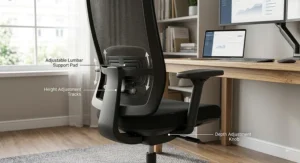
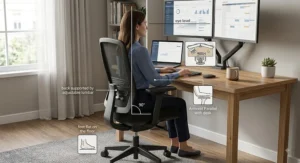
First 30 minutes: before you touch a single lever, sit in the chair with your feet flat on the floor and your knees roughly level with (or very slightly below) your hips. Adjust seat height first, always — every other adjustment is calibrated relative to this baseline, so doing them in the wrong order means redoing them anyway. Next, set the lumbar support so it sits in the small curve of your lower back, not your mid-back; on chairs like the SIHOO M102C and FlexiSpot C7, this means physically sliding the pad up or down until you feel it, not guessing from the manufacturer’s default position.
Common first-week mistakes: the most frequent error is leaving tilt tension on the factory default, which is usually calibrated for an average body weight and feels either too loose (you fall backwards) or too stiff (you can’t recline at all). Spend five minutes adjusting the tension dial, usually located under the seat, until a gentle lean back feels controlled rather than sudden. The second common mistake is setting armrests too high, which pushes the shoulders up and causes exactly the neck tension the chair was bought to prevent — armrests should let your elbows rest at roughly 90 degrees with shoulders relaxed down, not shrugged.
Maintenance schedule: mesh backs on chairs like the SIHOO M18 and Doro C300 benefit from a monthly vacuum with a soft brush attachment to stop dust building up in the weave. Check and re-tighten caster and gas-lift fixings every three to six months, particularly on folding models like the FlexiSpot Foldex, where the extra hinge point is the first thing to loosen with regular use. Gas cylinders on any chair typically last five to ten years under normal home-office use; if your chair starts sinking slowly during the day, that’s the part to investigate first, not the whole chair.
Real-World Scenarios: Matching the Chair to the Person
The student in a shared house, budget under £180, desk shared with a bed frame in a single room: the FlexiSpot Foldex or SIHOO M102C both make sense here — both fold or tuck away, both hold up to daily use, and neither requires a dedicated “office” space that a shared house or halls simply doesn’t have.
The full-time remote employee, eight-hour days, five days a week, dedicated small home office: this is where the extra spend on the SIHOO Doro C300 or the Steelcase Series 1 starts to earn its keep. Adaptive lumbar support and genuinely long-service-life build quality matter more the more hours you clock, and the cost-per-use maths (covered properly below) tips clearly in favour of the mid-to-premium tier once you’re working full weeks from home.
The freelancer or hybrid worker who wants the home office to double as presentable video-call background and occasional guest space: the Herman Miller Sayl solves a problem none of the mesh chairs do — it looks like considered furniture on a video call, not office equipment dragged into a bedroom. For a hybrid worker splitting time between a company office chair and a home set-up, that visual coherence with the rest of the room is a genuine, if less obvious, buying factor.
Problem → Solution Guide
Problem: my desk is too low for a standard chair, so I can’t get my knees under it comfortably. Solution: prioritise chairs with a wide height-adjustment range, such as the FlexiSpot C7‘s 19.3–22.6 inch range, and consider pairing with a footrest if the lowest setting still sits too high relative to your desk.
Problem: I share my home office desk with a partner or flatmate of a very different height. Solution: choose the widest-adjustment chair on this list for the space, the FlexiSpot C7, which is explicitly built to suit users from roughly 5’4″ to 6’5″, rather than buying two chairs you don’t have room for.
Problem: my room is too small for a chair that sticks out from the desk when I’m not using it. Solution: the FlexiSpot Foldex is the only chair here designed specifically to fold flat and be stored elsewhere, which solves this more completely than any “compact” fixed-frame chair can.
Problem: I get lower back pain by mid-afternoon even though my chair has lumbar support. Solution: the lumbar pad is very likely misaligned rather than absent — reposition it to sit in the inward curve just above your hips, not your mid-back, and if it’s a static (non-adaptive) pad, recheck its position every time you change seat depth, since the two settings interact.
Problem: I’ve outgrown my starter budget chair after a year of full-time use. Solution: this is the natural upgrade path from something like the SIHOO M18 toward the SIHOO Doro C300 or Steelcase Series 1 — treat the first chair as a genuinely useful stepping stone rather than a failed purchase, since needs (and budgets) for a first home office rarely match those eighteen months later.
How to Choose an Ergonomic Office Chair for Home Office Use
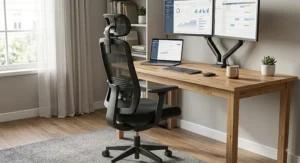
- Measure your space before you shop. Note the gap under your desk and the total floor space you can dedicate to a chair, including swivel clearance — this single step eliminates more unsuitable options than any spec comparison.
- Prioritise adjustable lumbar support over cushioning. A firm chair with correctly positioned lumbar support will outperform a plush chair with none, especially across a full working day.
- Match seat depth to your leg length, not just seat height. A seat pan that’s too long presses behind the knee; too short leaves the thighs unsupported — both cause discomfort that’s easy to misattribute to “the wrong chair” when it’s actually the wrong depth.
- Check the weight rating against your own weight, with margin. Manufacturers rate chairs for structural safety, and a chair used near its stated limit typically shows wear (sagging foam, looser gas lifts) faster than one with headroom.
- Decide whether adjustability or footprint matters more. The FlexiSpot C7 wins on adjustability range; the Herman Miller Sayl wins on footprint — few chairs do both equally well, so rank your priority honestly.
- Factor in your actual weekly hours, not aspirational ones. A chair used four hours a day, three days a week, has very different requirements to one used eight hours a day, five days a week — don’t over- or under-buy relative to real usage.
- Read the warranty terms, not just the length. A 12-year warranty (like the Sayl’s) or a lifetime warranty on parts (like the Foldex’s) is only useful if it covers the parts that actually fail — usually gas lifts, casters and recline mechanisms — so check what’s specifically included.
Compact Ergonomic Office Chair vs Standard Office Chair
The term “compact ergonomic office chair” gets used loosely, so it’s worth being precise about what actually differs. A standard-size ergonomic chair, like the FlexiSpot C7 or Steelcase Series 1, typically has a wider base, a taller backrest, and a larger overall swivel radius — features that generally improve support for larger frames and longer sitting sessions but demand more floor space. A genuinely compact ergonomic chair, like the SIHOO M102C or Herman Miller Sayl, trims the frame, narrows the backrest slightly, and in the Foldex’s case removes the fixed footprint entirely through folding.
| Factor | Standard Ergonomic Chair | Compact Ergonomic Chair |
|---|---|---|
| Typical footprint | 65–70cm swivel radius | 55–62cm swivel radius |
| Adjustability depth | Usually deeper (more axes) | Slightly reduced on some axes |
| Best for | Larger frames, dedicated office rooms | Small rooms, shared spaces, multi-use rooms |
| Example | FlexiSpot C7 | SIHOO M102C, Herman Miller Sayl |
The data here shows a genuine trade-off rather than one option simply being “better”: the FlexiSpot C7‘s wide seat-depth range is only possible because the frame itself is larger, while the Sayl‘s slim elastomer back is precisely what limits its lumbar-depth adjustability compared with foam-backed rivals. Buyers in a dedicated office room with space to spare should lean standard-size for the extra adjustability; buyers working from a converted alcove, box room or shared space should treat footprint as a hard constraint and shop compact first, adjustability second.
✨ Not sure which category fits your room? Measure your desk gap first — it’ll narrow this decision faster than any spec sheet.🤗
Common Mistakes When Buying an Ergonomic Desk Chair for Small Home Office
The single most common mistake is buying by price bracket alone rather than by room constraints — a beautifully specced chair that doesn’t physically fit under a desk is a wasted purchase regardless of how many adjustment points it has. A close second is assuming “mesh” automatically means “small,” when in fact several mesh chairs, including wider-frame options like the C7, have a larger footprint than some foam-backed compact designs.
Another recurring error is ignoring armrest width in narrow rooms: fixed or wide-swinging armrests can make a chair difficult to manoeuvre in and out of a tight desk gap, which is exactly the kind of daily friction that erodes goodwill toward an otherwise good chair. Buyers also frequently skip checking the minimum seat height, assuming all chairs adjust low enough for a petite frame or a low desk — worth confirming against your own desk’s under-surface clearance rather than assuming. Finally, a genuinely underrated mistake is buying the cheapest option available “for now” with a vague plan to upgrade later; as the long-term cost section below shows, that approach often costs more over three years than buying one step up initially.
Work From Home Ergonomic Chair Needs by User Type
A work from home ergonomic chair has to earn its keep differently depending on who’s sitting in it and how often. For occasional home workers — a couple of days a week, supplementing an office desk — a budget pick like the SIHOO M18 or M102C comfortably covers the need without over-investing in a chair that sits empty three days out of five. For full-time remote employees, the calculation changes: eight hours a day, five days a week means roughly 2,000 hours of annual use, at which point the adaptive lumbar support and sturdier mechanisms of the SIHOO Doro C300 or Steelcase Series 1 stop being a luxury and start being a genuinely sensible allocation of budget.
For anyone managing an existing back, neck or joint condition, the priority shifts again — precise lumbar positioning and a broader adjustment range become more important than footprint or styling, which is where the FlexiSpot C7‘s wide seat-depth and height range earns particular consideration. It’s worth noting that this is a general buying guide rather than clinical advice; anyone managing ongoing pain should also consult the NHS’s guidance on back pain, which covers when self-management is appropriate and when to seek a GP or physiotherapy referral. For self-employed workers or those managing a health condition, it’s also worth knowing that the UK Government’s Access to Work scheme can, in some circumstances, help fund specialist seating adaptations — more on that in the safety and regulations section below.
Long-Term Cost & Maintenance
Sticker price tells you almost nothing about total cost of ownership. A £150 chair replaced every eighteen months because the gas lift fails or the foam collapses works out more expensive over three years than a £350 chair that lasts the full period without a single replaced part — and that’s before accounting for the value of your own comfort and productivity during the gap between “chair broke” and “replacement arrived.”
| Chair | Purchase Price | Typical Expected Lifespan | Approx. Cost Per Year |
|---|---|---|---|
| SIHOO M102C | £130–£160 | 3–4 years | ~£40 |
| SIHOO Doro C300 | £260–£340 | 5–6 years | ~£50 |
| Steelcase Series 1 | £350–£450 | 10+ years | ~£40 |
| Herman Miller Sayl | £650–£850 | 12+ years (matches warranty) | ~£60 |
Interpreting the table above: cost-per-year, rather than upfront price, tells a very different story to the headline numbers — the Steelcase Series 1 and SIHOO M102C land at a remarkably similar annual cost despite a roughly £250 gap in purchase price, purely because of expected service life. The Herman Miller Sayl costs more per year than either despite its long warranty simply because the entry price is so much higher, which is a fair reason to treat it as a design-and-longevity purchase rather than a pure value play. None of this accounts for maintenance costs, which are genuinely minimal across this list — occasional caster or gas-lift replacement, typically under £20 in parts, is the extent of it for most users.
Features That Actually Matter (And Those That Don’t)
Matters: independently adjustable lumbar depth. The single biggest differentiator in genuine comfort across a full working day, and the feature most worth prioritising over anything cosmetic.
Matters: seat depth adjustment. Frequently overlooked in favour of headline features like headrests, but directly affects circulation and thigh support during long sessions — the FlexiSpot C7‘s range is a genuine standout for exactly this reason.
Doesn’t matter much: the number of wheel casters advertised. Five casters is now standard across essentially every chair on the market, including every model on this list; it’s not a meaningful differentiator despite frequently being listed as a headline feature.
Doesn’t matter much: RGB lighting or “gaming” branding on ergonomic-marketed chairs. None of the chairs on this list include it, deliberately — it adds cost without adding support, and buyers focused on genuine home-office ergonomics are better served spending that budget on adjustability instead.
Matters, but is often skipped: weight capacity headroom. A chair rated exactly at your body weight will show wear faster than one with 20–30% headroom; this is a genuinely practical spec rather than a marketing number.
Doesn’t matter as much as marketing suggests: headrest presence alone. A headrest that doesn’t adjust to your actual neck height, like the fixed unit on the base SIHOO M102C, provides limited practical benefit over no headrest at all — adjustability of the feature matters more than its mere existence.
Safety, Regulations & DSE Compliance Guide
If you’re employed and working from home, your employer has legal obligations under the Health and Safety (Display Screen Equipment) Regulations, enforced via HSE’s display screen equipment framework, which applies to home workstations just as it does to office-based ones. In practice, this means employees who habitually use a computer as a significant part of their job are entitled to a workstation risk assessment, and employers are expected to address issues identified — including inadequate seating — as part of that process. It’s worth raising with an employer directly if you’re working from home regularly and currently seated on furniture that was never intended for daily desk use.
For self-employed workers, or those managing a disability or long-term health condition that affects how they work, the Government’s Access to Work scheme can in some circumstances help fund specialist seating adaptations, though it generally does not cover a standard-issue chair outright — funding is typically directed at adaptations or specialist chairs beyond what would ordinarily be provided. It’s genuinely worth checking eligibility if back, neck or joint issues are affecting your ability to work comfortably. On the product side, look for chairs carrying recognised testing standards — BIFMA (the North American furniture testing standard many manufacturers, including SIHOO, voluntarily comply with) and TÜV certification both indicate the chair has been tested against structural and safety benchmarks rather than simply marketed as “heavy duty” without evidence.
Building Your WFH Desk Setup Around the Right Chair
A chair doesn’t operate in isolation, and a genuinely effective WFH desk setup treats seating as one component of a wider system rather than a standalone purchase. Desk height and chair height need to work together: even the best chair on this list will feel wrong paired with a desk that’s the wrong height for your frame, which is why several chairs here — notably the FlexiSpot C7 — prioritise a wide adjustment range specifically to accommodate desks that weren’t custom-fitted to the user.
Monitor height matters just as much as chair adjustment: a screen positioned too low encourages exactly the forward neck lean that good lumbar support is trying to counteract from the opposite direction, effectively cancelling out the benefit. As a rough starting point, the top of your monitor should sit roughly at eye level when your chair is correctly adjusted — this is a genuinely underrated part of a WFH desk setup that most buying guides skip entirely because it’s not a chair spec, even though it directly determines whether the chair’s ergonomics actually get used properly. Cable management and desk clearance also interact with chair choice more than people expect: a folding chair like the FlexiSpot Foldex is far less useful if cables and desk clutter block the space it needs to fold into, so it’s worth planning storage alongside the chair itself rather than as an afterthought.
Small Room Furniture: Maximising a Compact Home Office
Choosing small room furniture for a home office comes down to a few repeatable principles beyond the chair itself. Multi-functional pieces — a desk that also serves as a console table, or a chair that folds away entirely — do more for a small room than simply buying smaller versions of standard furniture, because the goal isn’t shrinking every item proportionally, it’s reclaiming floor space when the room needs to serve another purpose.
Colour and material choice on a chair also has a genuine, if often ignored, effect on how a small room feels: a bulky dark-fabric chair reads as considerably larger visually than a mesh-backed chair in a similar footprint, simply because mesh allows sightlines through it rather than blocking them. This is part of why the Herman Miller Sayl‘s open, unframed back design is so consistently recommended for smaller spaces — it’s not just a smaller chair, it visually occupies less of the room than its actual measurements suggest. Practical furniture arrangement matters too: positioning a desk against a wall rather than floating it in the room frees up the swivel radius a chair needs without requiring extra square footage, and it’s a free adjustment that costs nothing beyond rearranging what you already own.
Remote Work Equipment Checklist Beyond the Chair
A genuinely comfortable remote work setup rarely comes down to the chair alone, even though it’s usually the single biggest investment. A monitor arm frees up desk space and allows the screen-height adjustment mentioned earlier, which matters more in a small room where desk surface is already at a premium. A footrest — built into chairs like the FlexiSpot Foldex and FlexiSpot C7, but available separately for others — solves the common problem of a desk being fractionally too high even once the chair is at its lowest setting.
Beyond furniture, decent task lighting reduces the temptation to lean forward toward a screen to compensate for poor visibility, which undermines good chair posture regardless of how well the chair itself is set up. And for anyone doing genuinely long stretches at a desk, a simple kitchen timer or phone reminder to stand and move every 45–60 minutes does more for long-term comfort than almost any single piece of equipment — no chair, however well engineered, fully substitutes for regular movement across a working day.
Frequently Asked Questions
❓ What is the best ergonomic office chair for home office use on a budget?
❓ How do I know if my current chair is causing my back pain?
❓ Can a compact ergonomic office chair be as supportive as a full-size one?
❓ How often should I replace my work from home ergonomic chair?
❓ Is it worth buying an expensive chair for a small home office?
Conclusion
There’s no single “best” ergonomic office chair for home office use — there’s only the best match for your room, your budget, and how many hours you’ll actually spend in it. If space is the binding constraint, the FlexiSpot Foldex or SIHOO M102C solve that directly rather than compromising around it. If you’re working full-time from home and treating this as a genuine long-term investment, the SIHOO Doro C300 and Steelcase Series 1 both make a strong, defensible case once cost-per-year rather than sticker price enters the equation. And if design matters as much as function in a room that doubles as living space, the Herman Miller Sayl remains the standout for combining a genuinely small footprint with premium engineering.
What ties every recommendation here together is the same underlying principle: buy based on adjustability that matches your body and your room, not based on which chair has the longest feature list. A chair with three settings correctly aligned to your frame will consistently outperform one with eight settings left on factory defaults. Measure your space, be honest about your weekly hours, and let those two numbers — more than any single spec — guide the final decision.
Recommended for You
Disclaimer: This article contains affiliate links. As an Amazon Associate, I earn from qualifying purchases. If you purchase products through these links, we may earn a small commission at no additional cost to you.
✨ Found this helpful? Share it with your friends! 💬🤗
